
Zhiya Lab · Development Journal
RubricFlow: Design Revolution
— From AI PPT Generation to Structured Editing
1. The Background
By the end of 2025, RubricFlow was still just a Google extension called Project Accelerator.
It all started back in 2024, when I was attending a seminar by Monica at HKU. I quietly thought that building browser extensions would be a great place to start learning. And then another question came to my mind: why couldn't PowerPoint slides be generated directly while browsing the web, simply by extracting keywords from the pages along the way?
Back then, AI wasn't nearly as versatile as it is today, and AI-generated presentations weren't particularly impressive in terms of visual design. Surprisingly, a simple extension that scraped keywords from web pages could produce presentations comparable to what gpt-4o was capable of at the time.
Meanwhile, as someone who wasn't particularly proficient in frontend development yet, I found myself wondering about something rather strange. Websites could have such beautifully polished interfaces, and with existing templates (especially with Gemini's assistance at the time), building a webpage could actually be easier than repeatedly dragging text boxes around in Microsoft Office.
So why not just take a screenshot of a webpage and turn it into a PPTX?
Then I remembered a feature in Microsoft Edge: "Print to PDF."
That gave me a strong urge to test an idea:
What if I rendered the presentation directly in a browser, then used its built-in PDF export? Could I create an incredibly polished presentation in a fraction of the time, without anyone even noticing how it was made?
And that was how RubricFlow was born.
With this rather clever approach, from January to February in 2026, the very first version took less than a month to build.
I call this first generation the AI Generation Phase.
At its core, the workflow was surprisingly straightforward. It consisted of four stages, taking users from their initial notes and evaluation criteria to a complete, editable presentation.
The Beginning Workflow
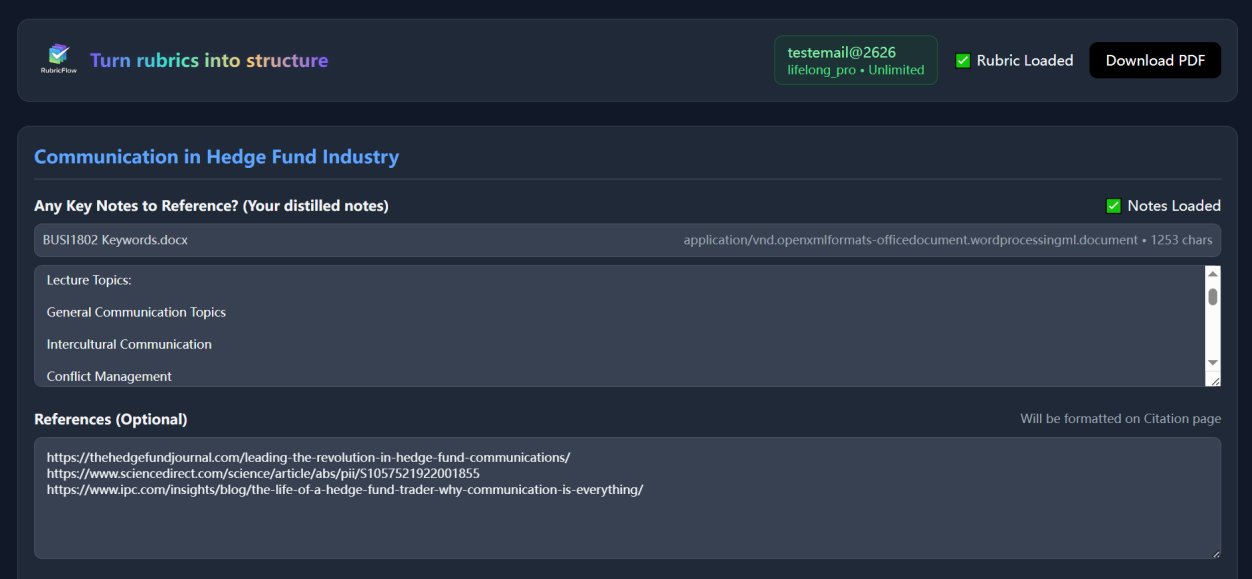
01 Input — Define Rubric and Notes
Users begin by providing a rubric containing evaluation criteria, along with distilled notes and optional references. Notes are recommended to be written as concise bullet points, with one idea per line, rather than long paragraphs.
The purpose of this stage is to establish what the presentation should cover and how its content will be evaluated.
02 Generation — Produce the First Draft Deck
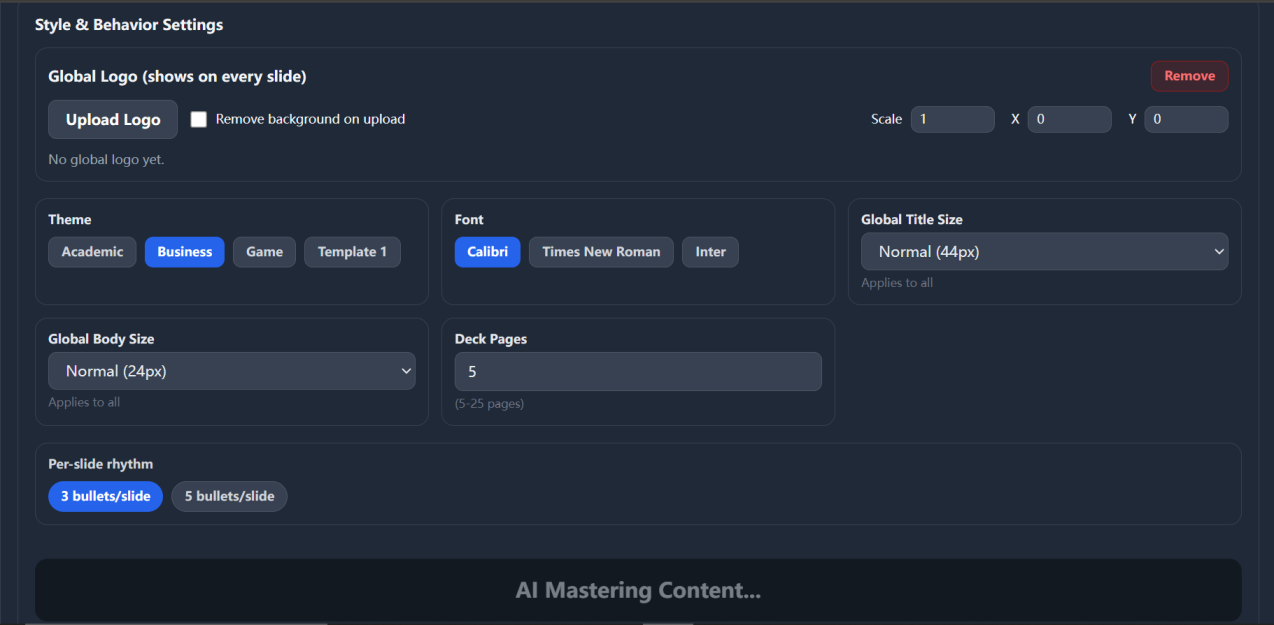
Users can configure the presentation theme, font, title size, body size, number of slides, and bullet-point density. These settings act as global constraints intended to maintain consistency across the deck. After quickly configuring the style and behavior parameters, users click Generate Deck Now to initiate the AI-powered presentation generation process.
The system processes the provided rubric, notes, and references together, generating a complete first-draft slide deck rather than just an outline, with an immediately rendered preview.
This stage was designed to minimize the time required to turn the initial inputs into a structured presentation.
03 Editing — Refine Slides Individually
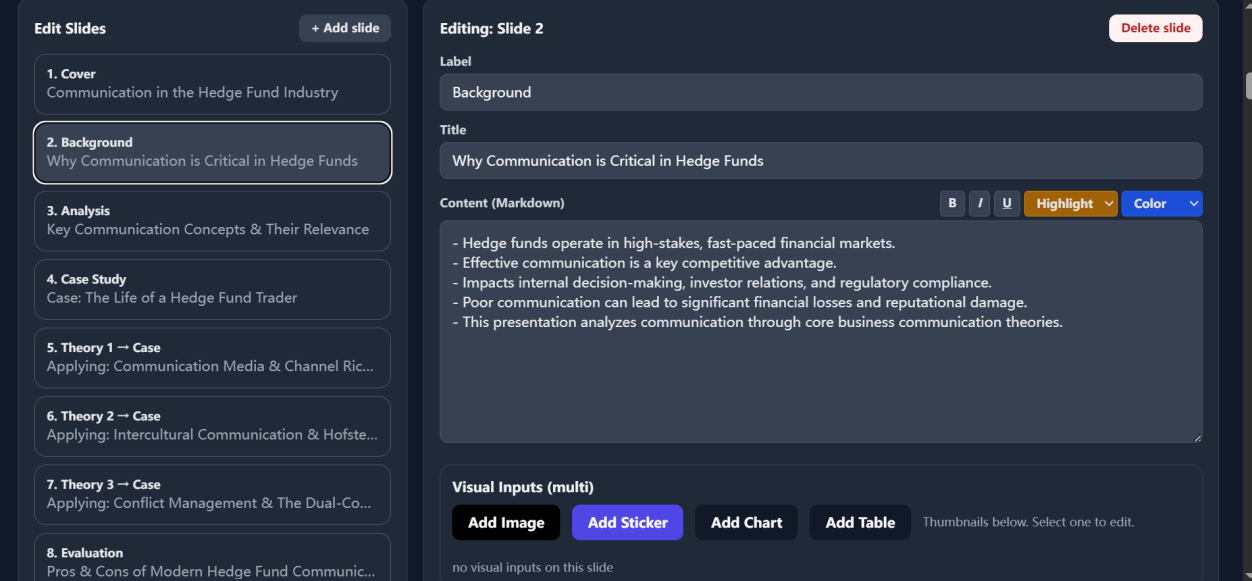
After generation, users can select individual slides and modify their titles and Markdown content. Images, charts, and tables can be added where they support the presentation's arguments.
The editing process emphasizes clear bullet points, consistent structure, and alignment with the original rubric. Slides that do not contribute to meeting the evaluation criteria can be removed.
04 Preview — Integrate Inputs into a Complete Deck
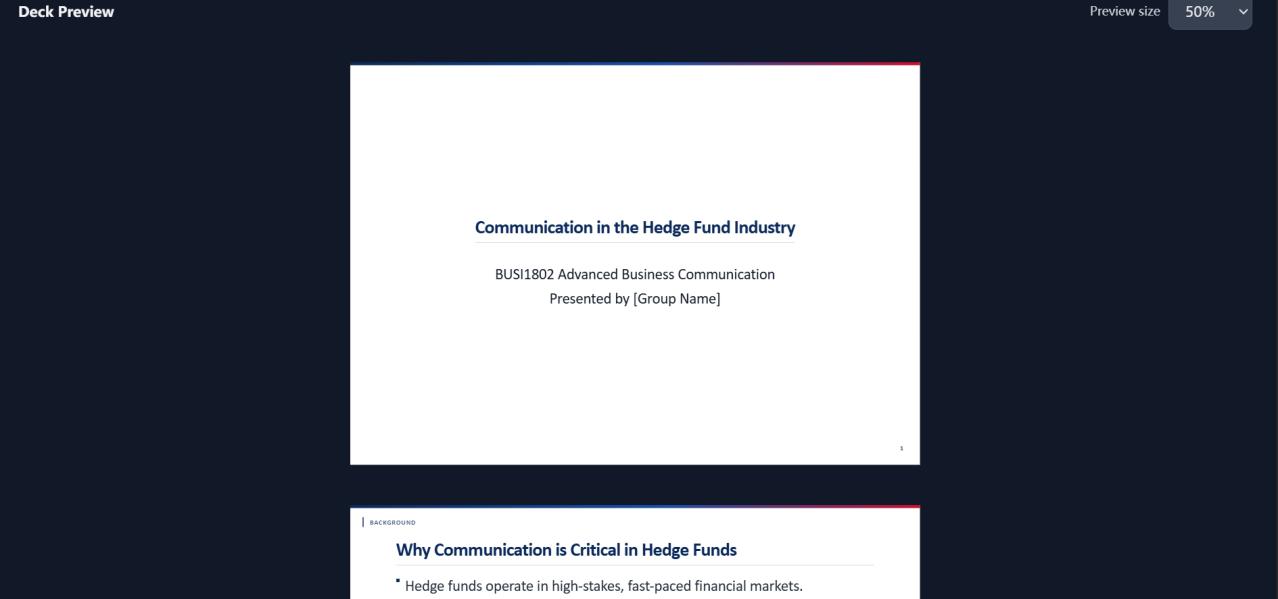
Once the generation process is complete, RubricFlow integrates the provided rubric, notes, references, and style and behavior settings into a complete presentation.
The resulting deck is rendered as a preview, allowing users to review the overall structure, visual consistency, and content before making further edits or exporting the final presentation.
This stage brings all previous inputs together into a single, coherent output.
This first version laid the foundation for RubricFlow. AI was deeply integrated into the editor, generating an entire deck with a single click. The experience was full of surprises. And there I was, already so full of myself that I actually went ahead and registered for a company.
Yet despite having what I considered a perfect workflow, this version did little to eliminate the friction of making presentations. It merely shifted the friction from creating everything from scratch to refining what had been generated.
As a product narrative, and in terms of how easily people could understand it, I would give it full marks. But a generated deck that was actually ready to submit for an assignment? 60 out of 100.
I even took a generated deck to a professor during Summer School. The feedback was excellent, but I kept wondering to myself: how much of that high evaluation came from the generator itself, and how much came from my own refinement, experience, and presentation skills compensating for its shortcomings?
I. NEED. TO. REBUILD. EVERYTHING.
Not for any particular reason. I just wanted to see how far I could push it.
The Chaos Before Dawn
By August, I finally had a little more time on my hands. I had kept saying that I would take the previous version out into the market and start making money from it, but honestly, even I felt a little uneasy. I knew it was still nowhere near the standard I had in mind.
The first thing I did was replace the UI layout, which had editing controls on top and the deck preview below, with a side-by-side layout. When people adjust parameters without being able to see the visual result at the same time, they often have to keep scrolling back and forth to check their changes. That was unnecessary friction.
But how should the two sides be laid out? Should they have equal widths, with a 1:1 ratio? Would a large white deck preview on the right overwhelm the interface? What if users refreshed the browser and lost all their previous work? And with so many parameters to adjust visually, how could I keep users from feeling that they had to learn an entirely new tool just to use it?
Then there was the account system. I had to connect it to the landing page, use the Supabase API to manage a shared database, integrate the Resend API with the [email protected] mailbox hosted by Zoho Mail, and configure Vercel environment variables to support its backend functionality.
The dependency chain was getting long and complicated. Yet RubricFlow was just a small frontend application. Even its AI wasn't self-trained; it was quietly calling the DeepSeek API behind the scenes.
The actual costs were so low, yet I was planning to charge users such a high subscription fee. So I asked an engineer friend whether RubricFlow's pricing was reasonable.
He absolutely tore me apart.
That part of the product needed a major overhaul, too.
This entire phase was filled with chaos before the restructuring. At times, the product looked downright terrible.
Mature Web Version
After the New Moon in Virgo, I made two pivotal decisions.
- AI was removed from the core workflow.
DeepSeek had been masking the reliability issues in RubricFlow's own rendering engine. The product needed to confront the real problems head-on: structured editing, layout, and interaction friction.
The interface at this stage wasn't necessarily beautiful, but for the first time, the editor's fundamental capabilities were being put to the test.
- The account system was removed.
If the account system itself was adding friction and administrative overhead, why did it need to exist at all?
So, even with my very first Growth Intern already on board, I actually deleted the entire account system. Completely. A little awkwardly, perhaps, but decisively.
I felt a little bad for the intern, but this phase became a crucial turning point for RubricFlow.
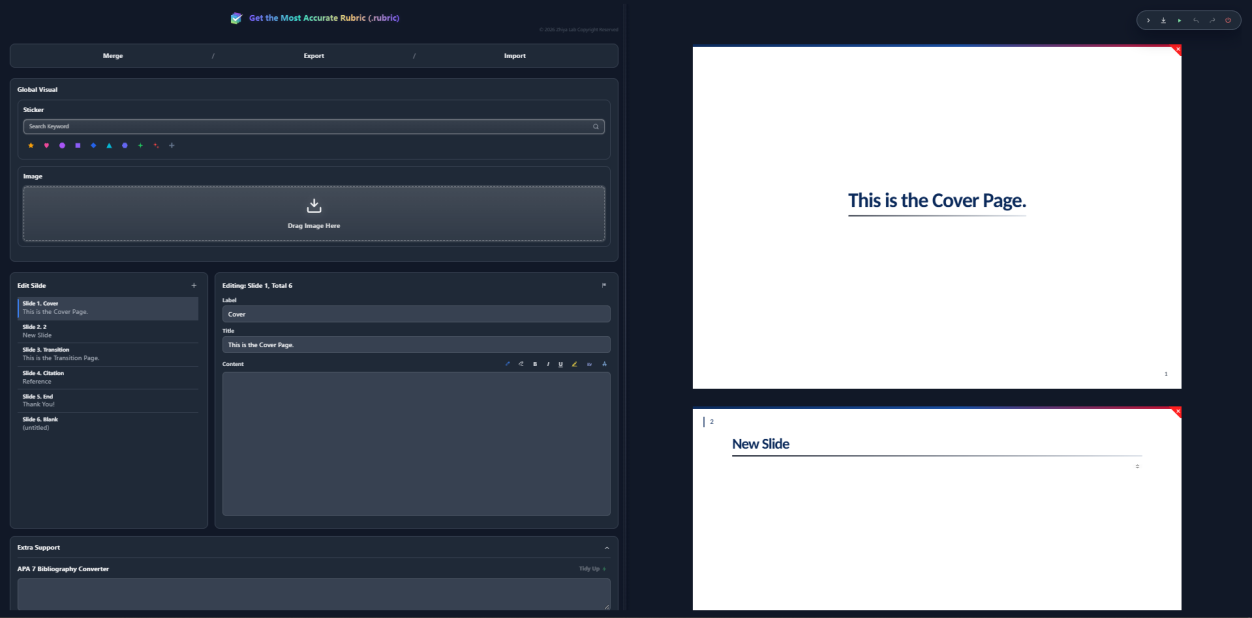
These two decisions marked a major shift in the product's direction. Now, let's look at the core architectural innovations introduced in the Web version.
2. RubricFlow Web: A Three-Layer Architecture
Card Engine
- Preset font sizes and styles — instead of making users adjust them manually every time.
- Synchronized, real-time feedback between the left and right panels — ensuring that text wraps consistently on both sides.
- Guaranteed text containment — preventing text from overflowing any slide.
Rule Engine
The rendering system is organized into four layers:
- Wording — the first layer.
- Image — the second layer.
- Sticker — the third layer, rendered as inline SVG directly in the browser. I wrote my own
svg-list.tslibrary to make these stickers available offline. - Crayon — the fourth layer.
This design works much like multiple windows stacked on a single screen: each layer has its own place, yet everything remains part of the same canvas. Once rendering was separated into layers, interaction friction dropped dramatically.
This was a fundamental product innovation. I suddenly realized why PPTX can require so much AI training and still fail at layout: Asking an AI to do graphic design is a completely different task from asking it to fill in a PowerPoint presentation.
Damn the historical baggage of PPTX. And why do you need to give people an infinite canvas in the first place? They just want to finish a presentation for an assignment, not learn graphic design from scratch.
The workflow of other AI presentation tools could almost be summarized like this:
The presentation the teacher wants → the presentation the student interprets → the third version, guessed by AI → the fourth version, revised and submitted by the student.
And even after all that, the generation result can still be far from what the teacher originally wanted. The assignment hasn't become easier to complete, either.
Image generation and image recognition have similar problems. It's not that AI literally has an "eye" that sees the world as humans do. Its visual perception and aesthetic judgment are fundamentally different from ours.
One Small Piece of AI: Tiny Tidy Engine
- APA 7 formatting
- DeepSeek API integration
These were genuinely useful presentation features, so I decided to keep them rather than cut them entirely. Users who didn't need this extra support could simply turn it off.
3. Redefining Rubric and the .rubric Specification
The Web version also introduced what I consider its most significant innovation: the ability to define what a rubric actually is.
"Rubric is a contract between Note and Slide."
It had finally reached the point where even the underlying file format had to be reinvented.
My experiments had revealed one of the biggest sources of friction in PPTX: every element seemed to compete for the same visual plane. And because I wanted the format to be readable by machines, and even AI, .rubric was designed as JSON from the very beginning.
As shown in Fig. 5, the Web version introduced three core functions: Import, Export, and Merge. Merge supports up to five .rubric files at a time.
Now, let's take this one step further. What would a group assignment workflow look like with RubricFlow?
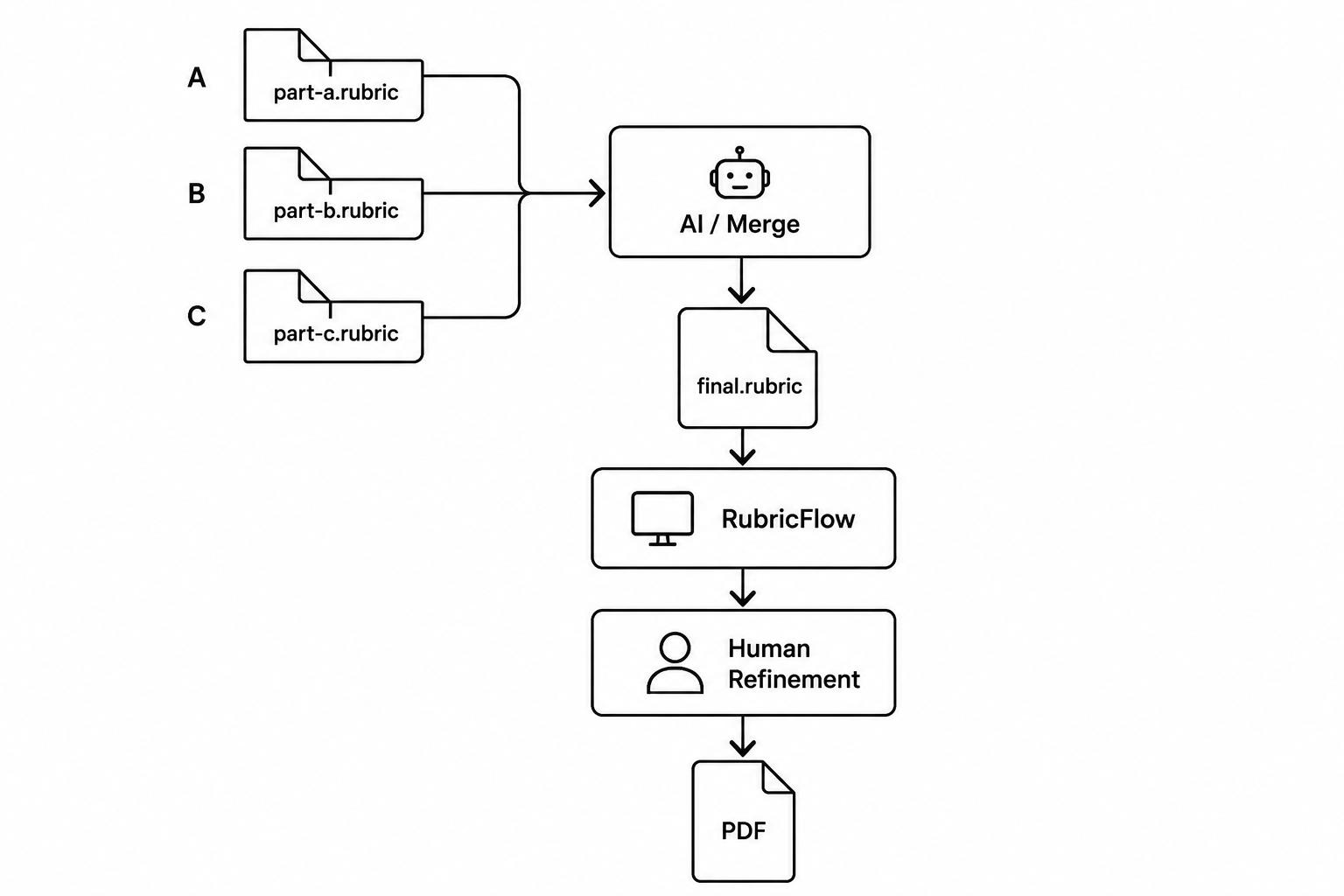
This also happens to address the free-rider problem in group projects. And the group leader no longer has to stay up late fixing everyone's formatting. There you go.
A Note from the Web Version's Static Landing Page
I also want to include a passage I wrote for the Web version's static landing page:
Then RubricFlow comes out — a workflow for turning information into a rubric.
Notes are easy to write, but hard to present; while slides are easy to present, but annoying to write.
Similarly, notes grow endlessly downward, and slides make you decide the layout before you know what you want to say.
Rich-text editors give you freedom, then make you maintain the formatting.
AI presentation tools make the slides for you, then make you fix what they made.
We wanted neither.
Try RubricFlow and Redefine Rubric.
And that was it. I was finally somewhat satisfied, though there was still one last thing to reflect on.
Web Version: Achievements and Limitations
The architecture of RubricFlow had genuinely matured. But the external pressure I had been under lately had made me too eager to prove myself. The result was a product that carried a certain sense of trying too hard to demonstrate its creator's capabilities.
RubricFlow's editing engine had grown more sophisticated, with improvements in structural control and visual polish. Yet these very improvements eventually produced an experience that felt intense, over-refined, and overly attached to its creator's presence.
People had to see the creator before they could use the product. But if the goal is to build an everyday editor, the creator should come after the work itself. Only then can the product stand the test of time.
My Verdict: An 80-point showcase that nobody would come back to use regularly.
4. From Web Demo to OS Infrastructure
So, what was RubricFlow still missing at this point?
Themes, a framework that could let them evolve, and a UI that felt less oppressive and less eager to prove itself.
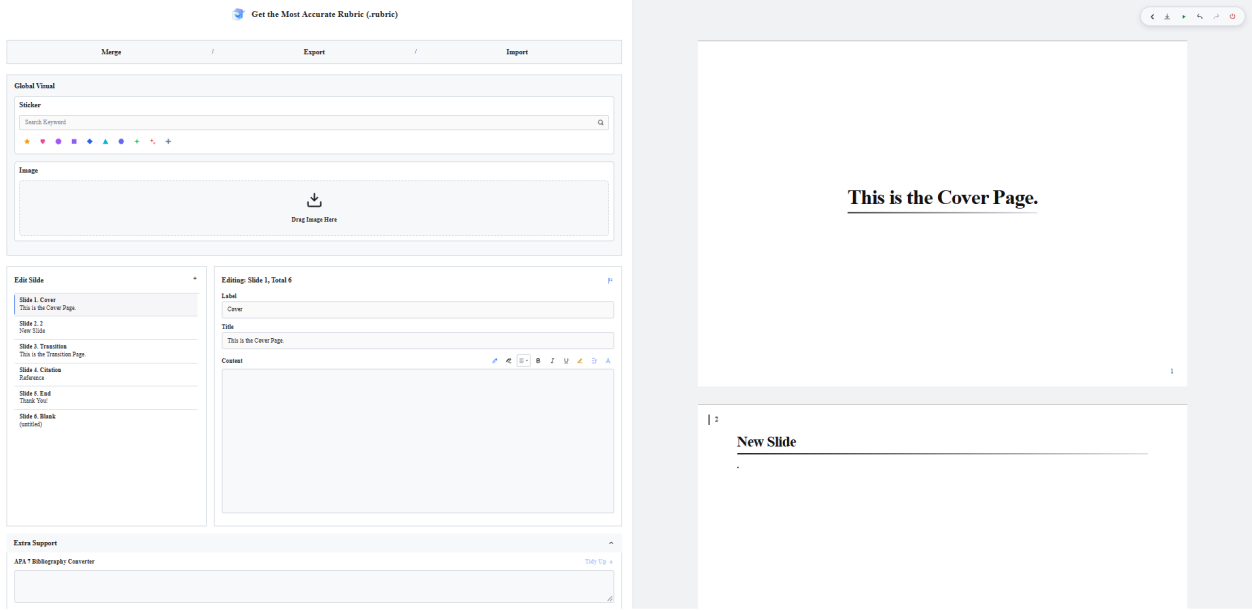
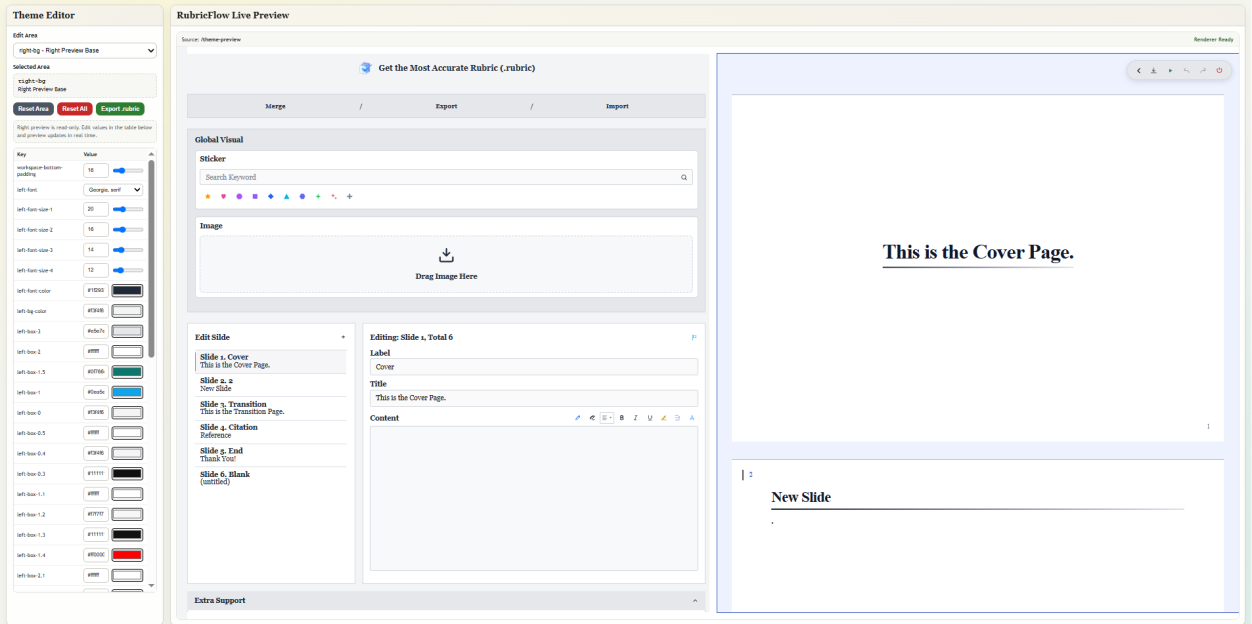
I then assigned a token name to every border element, laying the groundwork for the Theme Editor and future compatibility with the .rubric format.
Final Words
AI IS NOT NECESSARY. This kind of clean presentation editor can be built using technology from ten years ago.
IT'S JUST THAT PPTX HAS DOMINATED PEOPLE'S ASSUMPTIONS FROM THE VERY BEGINNING, AND NOBODY DARES TO QUESTION IT.
Chai Sui, 2026/10/23